After exiting the validation phase, the next step is telling Meta how your CRM events map to your actual sales process. This funnel configuration determines which leads Meta considers high-quality and what outcome your campaigns optimize toward.
Note
The Continue Setup button in Events Manager Settings becomes available only after validation is complete. Open it to start the funnel mapping workflow.
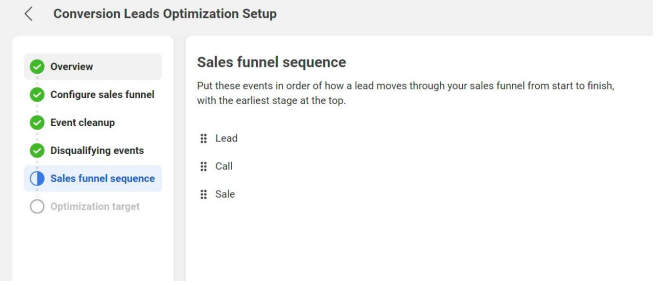
Funnel Mapping Overview
Meta presents the CRM events flowing to your Pixel and asks you to classify each one. For every event, you decide whether it belongs in your sales funnel, whether it disqualifies a lead, and where it falls in the sequence from first contact to conversion.
- In-funnel events — stages that represent progress toward a sale (e.g., Contacted, Demo Scheduled, Proposal Sent, Won).
- Disqualifying events — stages that remove a lead from consideration (e.g., Junk, Unqualified, Lost, No Response).
- Not in funnel — events that don't relate to your sales process and should be excluded from optimization.
Set the Event Sequence
Arrange your in-funnel events in the order they typically occur. Meta uses this sequence to understand how leads progress through your pipeline and which stages correlate with higher conversion probability.
A typical B2B funnel might look like:
- New Lead (initial Facebook-generated lead enters CRM)
- Contacted
- Qualified
- Proposal Sent
- Won
Your actual stages depend on how your CRM is configured. Use the event names SignalSight sends — they match the stage names or custom field values you mapped during source setup.
Mark Disqualifying Events
Disqualifying events tell Meta which leads will never convert, so the model stops optimizing toward similar profiles. Common examples:
- Junk / Spam Lead
- Unqualified
- Lost / Closed Lost
- No Response / Unreachable
Negative signals improve targeting
Marking disqualifying events is just as important as marking positive ones. The more complete the picture Meta has of your funnel — including where leads drop off — the better it can find audiences that reach your target stage.
Choose Your Optimization Target
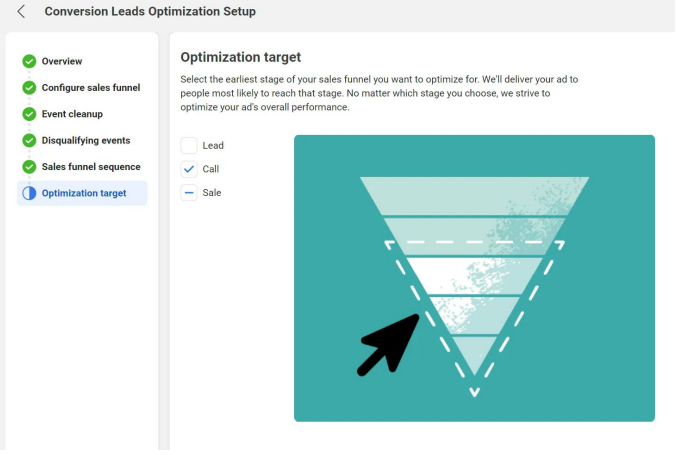
The final step is selecting the earliest funnel event you want campaigns to optimize toward. This is the stage that represents meaningful lead quality for your business.
The optimization target does not have to be the final event in your funnel. Choose the depth that best reflects the lead quality you want to attract:
- Qualified — if your goal is leads that pass your initial qualification criteria, even if they haven't closed yet.
- Demo Scheduled — if booking a meeting is your primary quality signal.
- Won — if you only want to optimize toward closed deals (requires enough volume at this stage).
Note
Pick a stage where you have sufficient event volume. Optimizing toward a late-stage event like Won works only if enough leads actually reach that stage for Meta's model to learn from.
After Funnel Setup
With your funnel mapped and optimization target set, you are ready to run Conversion Leads campaigns. Meta will use your funnel configuration to find audiences most likely to reach your chosen target stage.